Showing posts with label advice. Show all posts

Wednesday, 8 July 2015

Tools for the job

What are tools for the job, and what job am I talking about ?

Following jeff's article the-programmers-bill-of-rights.html
I spent some serious time trying out various equipement to help me get things done better and faster.

Some set of gear is a must for every software developer, be it professional work or in house development.
So the job target definition is: Achieving completion of pieces of technologies that work together to perform particular tasks.


But this can be applied to other computer based work such as web design, text editing or other long and tedious cycles that millions of people experience every day.

When I realised the productivity I gained by buying myself better equipment, I started enumerating every pieces which would be ideal to optimise work. 

This can be finding a keyboard making one typing faster - but also improving the overall experience of doing some work which also, in the end, increase productivity as there is a gain of focus and some non-coincidental willingness to work a bit longer...

Headphones

Headphones help gain focus. I find that both in the office environment, which can be noisy, and at home in total silence, having some music or white noise going on helps getting in a mind cocoon and get the work the attention it needs.
Non lyrical music being a particular choice.


Some over the head, or in-ear buds are more or less comfortable. With the convenient Amazon return policy, trying out a model for a few days helps pick the right set as wearing those for a couple of hours can become irritating.


The right Keyboard

It's a very personal thing, I find scissor and mechanical types the best. See my other article here that discuss the different keyboard technologies.


Mouse


Must have. Laptops often have decent touch pads, but don't be fooled, nothing is as accurate and fast as using a real optical mouse.

I favour the gaming mice as they offer the best dpi, with a cable so that I never have to worry about batteries, but I also recently used some wireless min-mice from Logitech that I found pretty good, and more convenient to carry outside.


Chair


Considering the hours we spend sitting in front of the screen, it's important to invest in a comfortable and ergonomic chair.

My choice goes for one of those china-made models that copy really got inspiration from high end designer chairs. 


Sweatshirt


Unless work takes place in a tropical country, a comfy and warm sweatshirt helps working long hours without having to worry about the heater.


Laptop


I'm an adept to desktop computers with proper keyboard and large double screens; but also to having a laptop.

Coffee shops are a good fit these days to do real work. My preference goes with no doubt to the macbook pro 13'. I struggle to find non mac hardware doesn't have to make a compromise.
Battery life, solidity, power, and the ability to run all osx, windows, and linux for testing simply makes it the perfect developer laptop


Internet connection

I see too  many IT enthusiasts, or even professionals who are not interested or knowledgeable when it to home broadband connections.
Get the facts straight: latency, downstream vs upstream bandwidth, network shaping and get yourself a quality hook to the cloud.


Also make sure that WiFi equipment internet provider sent you is reasonable. I find quality routers/WiFi to be a little hard to find for free.


Sunday, 18 November 2012

Mechanical Keyboard


The right keyboard


Three main types of keyboard exist, cheap dome keyboards that most people use with desktop computers, cisors keyboards buit on laptops - and the mechanical ones, used by gamers and geeks - those, more expensive were the kind of gear built with old machines.

Membrane switches is what most keyboards are built with, consisting of plastic domes under each keycap. Each dome must be fully pressed down to make contact with the circuit board underneath. The computer recognizes the contact and registers it as a keystroke. They aren't very durable, the dome can handle from 1 to 10 millions strokes.
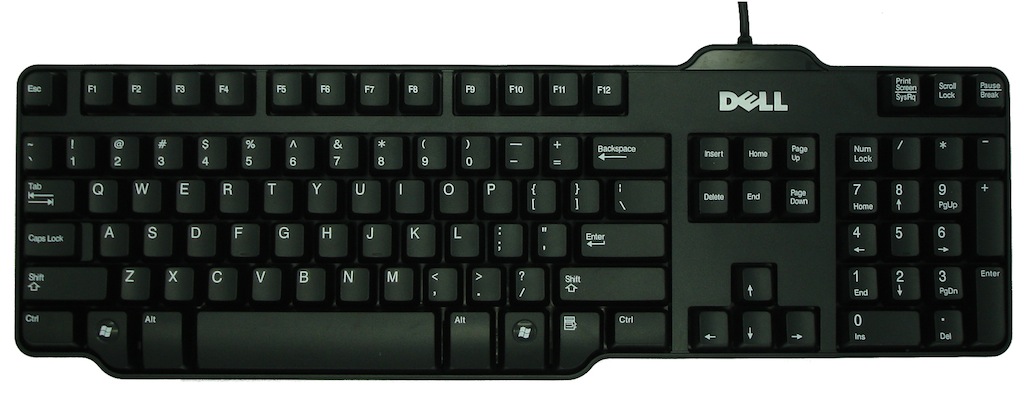
Below is one of the best membrane keyboard I found so far:
One of Dell's keyboard


Benefits of membrane Keys:
- Cheap
- Spill water on it with no regret


Scissors switches also use rubber domes, but a special plastic 'scissors' mechanism links the keycap to a plunger that depresses the rubber dome with a much shorter travel distance than the typical rubber dome (2 mm instead of 3.5 - 4 mm for membrane keyswitches).
The stabilizing scissor-like devices extend the lifespan of the membrane to as much as 20 million keystrokes, also they feel more solid due to less side to side movement during key travel. This type of keyswitch is usually found on the built-in keyboards on laptops.
Scissor-switch membrane keyboards are typically slightly more expensive and have a 'bouncier' feel to them, as the keys have scissor mechanisms to help them 'spring back' after you depress the keyswitch. They are harder to clean (due to the limited movement of the keys) but also less likely to get debris in them as the gaps between the keys are often less (as there is no need for extra room to allow for the 'wiggle' in the key) as you would find on a membrane keyboard.

Scissors switches
Scissors switch keyboards can also be found for desktop computers, I personally enjoyed using this Apple aluminum keyboard before I converted myself to Mechanical keyboards.

Apple aluminium keyboard
Benefits of scissors Keys:
- Last longer
- Quieter
- Stay clean longer


Mechanical swiches now, each key has its own physical switch. Once the switch is triggered, a signal is sent with the information of the key you just pressed. Seems similar to the membrane one but it does have benefits under the cover. On main difference is that on a membrane keyboard the fully press down is necessary to register the keystroke. On a mechanical keyboard, the switch handles it differently. The actuation point for a keystroke to register, for example is about 2mm on Cherry MX switches. Pressing down and “bottoming-out” on a key is about 4mm. This results in less fatigue and strain on your hands.


Switches - under the hood:


Cherry Brown - force 55cN - tactile non clicky
Cherry Black - force 60cN - non tactile non clicky

Cherry Blue - force 60cN - tactile clicky       
Cherry Red - force 45cN - non-tactile non clicky       


Resistance, membrane keyboards don't even specify the resistance of the keys - but with mechanical keyboards you get a range of switches which offer different resistance

Tactile, standard keyboards are all the same, needing a full press to register the stroke, typing indeed requires feeling the bottom of the key. With mechanical keyboards, the switch can either gives a feedback when the stroke is registered (mechanically), or give no feedback at all (smooth all the way down). Also, the feedback can be very gentle like on the cherry brown switches, or very strong like on the blue switches. Black switches are not tactile at all.

Clicky, some mechanical keyboards are clicky (often very loud) when the switch registers the stroke, the non clicky ones aren't completely silent but it won't trigger a click noise at key stroke.


Benefits of Mechanical Keys:
- Robustness
- Personalization
- Comfort

Mechanical keyboards offer a much better built quality due to their price mostly, and offer a wide range of switches to suits user's preferences. They are known to last longer than membrane keyboards. Each switch is expected to last around 50 million keystrokes. While a membrane keyboard lasts around 5-10 million. There is also a feature called, “N-key rollover” that is found in mechanical keyboards. This means no matter how many keys are being pressed at the same time, the computer will still register each one. This is made possible due to each key having its own switch.
Pressing a bunch of keys down on a membrane or scissors keyboard won’t give the same results...

A few great mechanical keyboards:

Termaltake Meka G1, owning this with black switches


Filco Majestouch


Das keyboard

Steel series 6v2


Credits to the animated images taken from Geekhack, also where I learned what I know about switches, great forum to get advice on gear in general

Sunday, 30 September 2012

Headphones

I would rank headphones number one among the list of tools a developer needs - Some people don't even have anything to put on their ears but many have some sets which don't even deserve to be manufactured:

Bad sound quality - uncomfortable 


Here are some more fancy but equally bad headphones:

Great looking but expensive for the sound quality


I don't understand why those Dr Dre gadgets are so popular, I agree they look good, but sound quality wise I keep being disappointed when trying them on.


So what to use ?

My criteria:

- Great sound reproduction
- Sound isolating
- Confort 
- Built quality

Here is my first choice:

Sony MDR V6
These are simply the best sound product I ever touched. I own it and I can't think of any alternative making me switch to another model. What's surprising is its price, those can easily be found for about £50-£60 brand new. 

They reproduce sounds as they come out of the amplifier which is what makes those the perfect choice. All that matters is to have the right source (not some lowly encoded mp3). 

Professional DJs use headphones belonging to this series and it's not shocking, they don't distort sounds, they don't amplify or covers bass, they just do what they are meant to do: reproduce sounds.

The MDR-7506 model which was made to replace the V6 are meant to be more 'professional' they ship with some gold connector, and the magnet is meant to be made with different material but the frequency response is a bit narrower on the 7506 (not going higher than 20k), I doubt normal ears could notice the frequencies above 20k but I don't see any proof that gold connectors improve anything and the magnet change is not proven (nor claimed) to bring anything better. So the V6 to me is a better choice as it sells at a slightly lower price.

These headphones have flaws though:

- They could be more confortable, the ear-cup is not very large, bigger ears would not fit in, I don't have this problem but still would have preferred having more room. Also, the material they used for the ear pad is terrible, some sort of fake leather that does not feel good after an hour of use. This was easily solved as I purchased some compatible replacement pair made of Velour from beyerdynamic

- The cord is ridiculous, way too long and curl like the cord of the home phone my grand ma still uses.

- The built quality is very good, but I do regularly get my fingers stuck and squeezed in the intersections on the ear-cups hooks  

I won't talk about the positives because everything else is perfect, I can't think any equipment delivering better sound - there might be dozens of models having deeper bass but these then struggle to throw clear mediums and high. I never had a chance to experiment some very high ends sets ( > $1000) but I'm sure with such budget one expects something else than a a pair of headphones to casually listen to music.

Those Sony MDR-V6 are the best choice, they are relatively cheap, solid, covers most of the surrounding sound.


Step up alternative:

The Denon D2000 also are a great choice, now owning and making use of both the Sony above and these, they offer a "deeper" sound, with a stronger accent on the bass.


They are much more expensive but at this price you get great level of comfort with real leather used to make the earpads. The cable this time was designed intelligently, as thick and straight. Also, this will fit bigger heads.
They are becoming harder to find, as I believe they were discontinued - pricing around £200 I think it's worth putting the money in when listening to hours of music every day.


Friday, 27 July 2012

Password Reset Facility


Very good article, details on everything you could think of when resetting a password when it comes to Security

Saturday, 3 March 2012

Posts way too long


Posts are too long. People write too much stuff.
I will eventually write some endless text, but hopefully not soon !


Keep it short, nobody has time, including you.