The right keyboard
Three main types of keyboard exist, cheap dome keyboards that most people use with desktop computers, cisors keyboards buit on laptops - and the mechanical ones, used by gamers and geeks - those, more expensive were the kind of gear built with old machines.
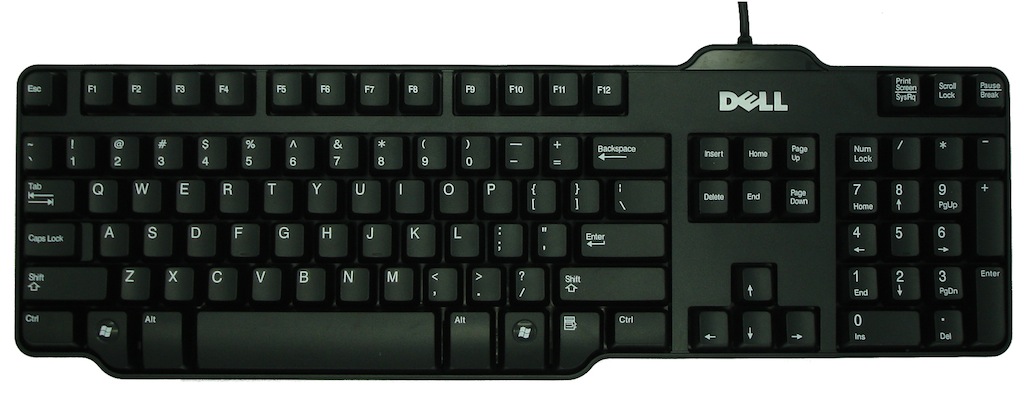
Membrane switches is what most keyboards are built with, consisting of plastic domes under each keycap. Each dome must be fully pressed down to make contact with the circuit board underneath. The computer recognizes the contact and registers it as a keystroke. They aren't very durable, the dome can handle from 1 to 10 millions strokes.
Below is one of the best membrane keyboard I found so far:
 |
| One of Dell's keyboard |
Benefits of membrane Keys:
- Cheap
- Spill water on it with no regret
Scissors switches also use rubber domes, but a special plastic 'scissors' mechanism links the keycap to a plunger that depresses the rubber dome with a much shorter travel distance than the typical rubber dome (2 mm instead of 3.5 - 4 mm for membrane keyswitches).
The stabilizing scissor-like devices extend the lifespan of the membrane to as much as 20 million keystrokes, also they feel more solid due to less side to side movement during key travel. This type of keyswitch is usually found on the built-in keyboards on laptops.
Scissor-switch membrane keyboards are typically slightly more expensive and have a 'bouncier' feel to them, as the keys have scissor mechanisms to help them 'spring back' after you depress the keyswitch. They are harder to clean (due to the limited movement of the keys) but also less likely to get debris in them as the gaps between the keys are often less (as there is no need for extra room to allow for the 'wiggle' in the key) as you would find on a membrane keyboard.
 |
| Scissors switches |
Scissors switch keyboards can also be found for desktop computers, I personally enjoyed using this Apple aluminum keyboard before I converted myself to Mechanical keyboards.
 |
| Apple aluminium keyboard |
Benefits of scissors Keys:
- Last longer
- Quieter
- Stay clean longer
Mechanical swiches now, each key has its own physical switch. Once the switch is triggered, a signal is sent with the information of the key you just pressed. Seems similar to the membrane one but it does have benefits under the cover. On main difference is that on a membrane keyboard the fully press down is necessary to register the keystroke. On a mechanical keyboard, the switch handles it differently. The actuation point for a keystroke to register, for example is about 2mm on Cherry MX switches. Pressing down and “bottoming-out” on a key is about 4mm. This results in less fatigue and strain on your hands.
Switches - under the hood:
 |
| Cherry Brown - force 55cN - tactile non clicky |
 |
| Cherry Black - force 60cN - non tactile non clicky |
 |
| Cherry Blue - force 60cN - tactile clicky |
 |
| Cherry Red - force 45cN - non-tactile non clicky |
Resistance, membrane keyboards don't even specify the resistance of the keys - but with mechanical keyboards you get a range of switches which offer different resistance
Tactile, standard keyboards are all the same, needing a full press to register the stroke, typing indeed requires feeling the bottom of the key. With mechanical keyboards, the switch can either gives a feedback when the stroke is registered (mechanically), or give no feedback at all (smooth all the way down). Also, the feedback can be very gentle like on the cherry brown switches, or very strong like on the blue switches. Black switches are not tactile at all.
Clicky, some mechanical keyboards are clicky (often very loud) when the switch registers the stroke, the non clicky ones aren't completely silent but it won't trigger a click noise at key stroke.
Benefits of Mechanical Keys:
- Robustness
- Personalization
- Comfort
Mechanical keyboards offer a much better built quality due to their price mostly, and offer a wide range of switches to suits user's preferences. They are known to last longer than membrane keyboards. Each switch is expected to last around 50 million keystrokes. While a membrane keyboard lasts around 5-10 million. There is also a feature called, “N-key rollover” that is found in mechanical keyboards. This means no matter how many keys are being pressed at the same time, the computer will still register each one. This is made possible due to each key having its own switch.
Pressing a bunch of keys down on a membrane or scissors keyboard won’t give the same results...
A few great mechanical keyboards:
 |
| Termaltake Meka G1, owning this with black switches |
 |
| Filco Majestouch |
 |
| Das keyboard |
 |
| Steel series 6v2 |
Credits to the animated images taken from
Geekhack, also where I learned what I know about switches, great forum to get advice on gear in general